MDBook - Collaborative Markdown Workspace for AI Teams
MDBook is a collaborative markdown editor SaaS for teams creating prompts, skills, specs, and knowledge bases that need to stay agent-readable and easy to share over the internet.
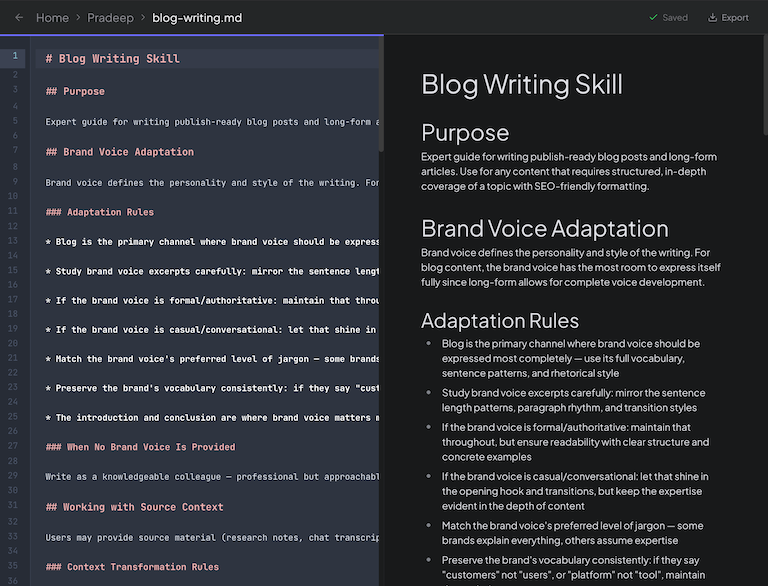
MDBook - Collaborative Markdown Workspace for the AI Era
MDBook is a markdown editor SaaS built for people creating content that is meant to be consumed by AI systems. Whether you are writing PRDs, architecture docs, system prompts, skills, or internal knowledge bases, MDBook gives you a collaborative workspace where the markdown stays clean, editable, and easy to share with both humans and agents.
At its core, MDBook solves a problem that shows up quickly on AI-heavy teams: the documents that matter most are often scattered across local files, shared drives, chats, and half-finished drafts. That makes collaboration messy for people and even worse for agents, which often end up reading stale copies instead of the current source of truth.
Why I Built MDBook
I built MDBook because markdown has become a real interface layer for modern software teams. It is no longer just documentation. It is prompts, specs, agent instructions, reusable skills, architecture notes, and operational knowledge that directly shapes how AI systems behave.
The problem is that most workflows around markdown are still built for a local-file world. One person edits a file, another person reviews it somewhere else, and then teams try to coordinate changes through chat, pull requests, or copied snippets. That friction gets worse when multiple people need to contribute to the same prompts or skills.
The second problem is access. If an agent needs the latest prompt library or skill definition, it should not have to depend on someone exporting a file, syncing a folder, or sending around a new copy. I wanted a system where teams could collaborate directly in the product and let agents access approved markdown content over the internet from a single, current source.
How It Works
MDBook combines a markdown-first editor with project organization and sharing. The editing experience is built around two synchronized panes:
- A WYSIWYG editor for fast, comfortable writing
- A raw markdown editor for precise control over source
Both views are editable, and both stay in sync, so you can move fluidly between visual editing and raw markdown without switching tools or losing structure.
Projects give teams a clean way to organize related files. You can keep prompts, specs, skills, and supporting knowledge grouped together instead of spreading them across separate folders, note apps, and local repos.
When you want to collaborate, you can share a project with teammates by email and give them view or edit access. That keeps the workflow simple. Everyone works on the same source material in the same place instead of passing documents around through side channels.
Built for Human and Agent Collaboration
MDBook is designed for a new kind of documentation workflow where the audience is not just your team, but also the agents your team relies on.
For people, that means a better environment for collaborative editing, review, and organization. Prompts and skills stop being hidden inside one developer’s local folder and become shared team assets.
For agents, MDBook supports general access to selected markdown files and folders over the internet. That means an agent can fetch the current version directly instead of working from an outdated local copy that may already be wrong. If your team updates a system prompt, a reusable skill, or a product spec, the latest version is immediately available from the same shared source.
That is the workflow I wanted most: one place to create, refine, and share markdown-based assets, with collaboration built in and agent access treated as a first-class feature instead of an afterthought.
Core Workflow
The day-to-day MDBook workflow stays intentionally simple:
- Create a project for a product, team, or knowledge area.
- Add markdown files for prompts, skills, specs, or documentation.
- Edit content in either the visual pane or raw markdown pane.
- Share the project with collaborators when others need to contribute.
- Enable general access for the files or folders that agents should be able to read directly.
- Export clean markdown files whenever you need a local or versioned copy.
Auto-save keeps the editing flow lightweight, and passwordless email login removes unnecessary setup friction when inviting collaborators.
Get Started
If your team is still building prompts, skills, and AI-facing documentation through a mix of local files, copied snippets, and chat threads, MDBook gives you a cleaner workflow. Write in markdown, collaborate in one place, and let agents access the latest approved content directly from the internet when needed.
MDBook is built for the teams treating markdown as real product infrastructure, not just notes.
MDBook gives AI teams a shared markdown workspace for prompts, skills, specs, and knowledge, with direct internet access for agents built into the workflow.
Key Features
Dual-Pane Editing
Edit rich content and raw markdown side by side with both panes fully editable and always in sync.
Project-Based Organization
Group prompts, skills, PRDs, specs, and knowledge files into structured projects inside one workspace.
Simple Collaboration
Invite teammates by email with view or edit permissions so everyone can contribute in one place.
Auto-Save
Changes save automatically after inactivity so teams can focus on writing instead of managing drafts.
Clean Markdown Export
Download plain `.md` files whenever you need a portable copy for repos, backups, or external workflows.
General Access for Agents
Expose selected markdown files and folders over the internet so agents can read the latest version directly.
Ready to build something?
Explore the live demonstration or dive into the codebase to see how it's built.