Super Sticker - Browser Sticky Notes Extension
A browser extension that lets you attach sticky notes to any element on any webpage. Notes persist across sessions and work on Chrome, Brave, Edge, and Firefox.
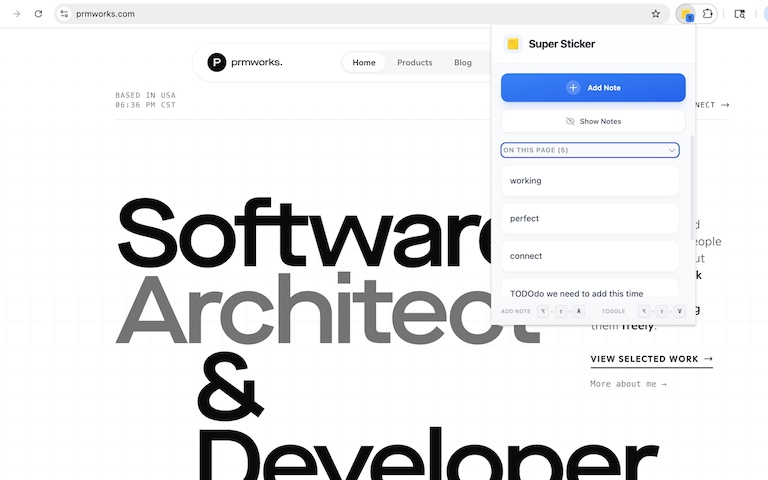
Rendering: GPU-Accelerated
Viewport: 1920x1080
Contents
Links
Super Sticker - Browser Sticky Notes Extension
Super Sticker is a browser extension that lets you attach sticky notes to any element on any webpage. Whether you want to remember something about a specific button, paragraph, or image, you can simply click on it and add a note. Your notes are saved and will be there when you come back to the page later.
Why Use Super Sticker?
We often find useful information on websites and want to remember it for later. Bookmarks save the page, but what about a specific part of it? Super Sticker solves this by letting you attach notes directly to elements on any webpage. It’s like putting sticky notes on a document, but for the web.
You can use it to annotate articles while reading, leave reminders on frequently visited pages, or mark important elements during research. Your notes stay attached to the exact elements where you placed them.
Key Features
- Attach Notes to Any Element: Click the “Add Note” button, hover over any element on the page, and click to attach your note right there.
- See All Notes on a Page: Click “Show Notes” to see every note you’ve added to the current page at once.
- Persistent Storage: Notes are saved automatically and restored whenever you revisit the page.
- Smart Positioning: Notes adjust themselves to stay visible and avoid going off the screen edges.
- Glassmorphism Design: Beautiful frosted glass look that makes notes easy to read without being distracting.
- Orphan Notes Panel: If an element you added a note to gets removed from the page, you can still access that note from a collapsible panel.
- Keyboard Shortcuts: Add notes with
Alt + Shift + A, toggle visibility withAlt + Shift + V, and pressEscapeto cancel. - Cross-Browser Support: Works on Chrome, Brave, Edge, and Firefox.
How It Works
Once installed, click the extension icon to open the popup. You’ll see two main buttons: “Add Note” and “Show Notes”.
To add a note:
- Click “Add Note” in the popup (or press
Alt + Shift + A) - Hover over any element on the page — it will highlight with a dashed border
- Click the element where you want to attach your note
- Type your note and save it
- Keep adding more notes or click “Done Adding” when finished
Your notes appear as small sticky notes attached to the elements you selected. They’re saved automatically and will be there next time you visit the page.
User Interface & Options
The extension provides a clean and simple interface:
- Popup Menu: Quick access to add notes or show existing notes
- Note Editor: Simple text editor with save and cancel buttons
- Notes Display: Beautiful glassmorphism styled notes that float near their attached elements
- Orphan Panel: Collapsible panel at the bottom of the page showing notes for removed elements
- Keyboard Shortcuts: Fast access without needing to open the popup
Keyboard Shortcuts
| Shortcut | Action |
|---|---|
Alt + Shift + A | Start adding notes |
Alt + Shift + V | Toggle note visibility |
Escape | Exit selection mode or cancel editing |
Technical Details
- Built with TypeScript and React
- Uses WXT framework for cross-browser extension development
- Works with both Manifest V3 (Chrome/Brave/Edge) and Manifest V2 (Firefox)
- Notes stored using browser’s local storage API
- Smart element targeting using CSS selectors
- Lightweight and fast
Browser Compatibility
| Browser | Status |
|---|---|
| Chrome | ✅ Supported |
| Brave | ✅ Supported |
| Edge | ✅ Supported |
| Firefox | ✅ Supported |
Get Started
You can get Super Sticker from the GitHub repository. Clone the repo, run npm install, and build it for your browser. Load the built extension in developer mode and start adding notes to any webpage you visit.
Super Sticker makes it easy to annotate any webpage with sticky notes that stay exactly where you put them. Never lose track of important information again!
Key Features
Attach Notes to Any Element
Click any element on a webpage and attach a sticky note directly to it.
Persistent Storage
Notes are saved automatically and restored when you revisit pages.
Smart Positioning
Notes automatically adjust their position to stay visible within the viewport.
Glassmorphism Design
Beautiful frosted glass look that blends nicely with any website.
Orphan Notes Panel
Access notes even when the original element has been removed from the page.
Cross-Browser Support
Works on Chrome, Brave, Edge, and Firefox browsers.
Keyboard Shortcuts
Quick access to add notes and toggle visibility without using the mouse.
Tech Stack
Ready to build something?
Explore the live demonstration or dive into the codebase to see how it's built.